Set up a project
The first journey: install the package, let Partition write its configuration with you, take a first measure of the Context Budget, and give each of your rules a scope. It is the same on a new repository and on one that already has years of code. Why the method works this way is in Why Partition; where each document of this article lives is in the repository map.
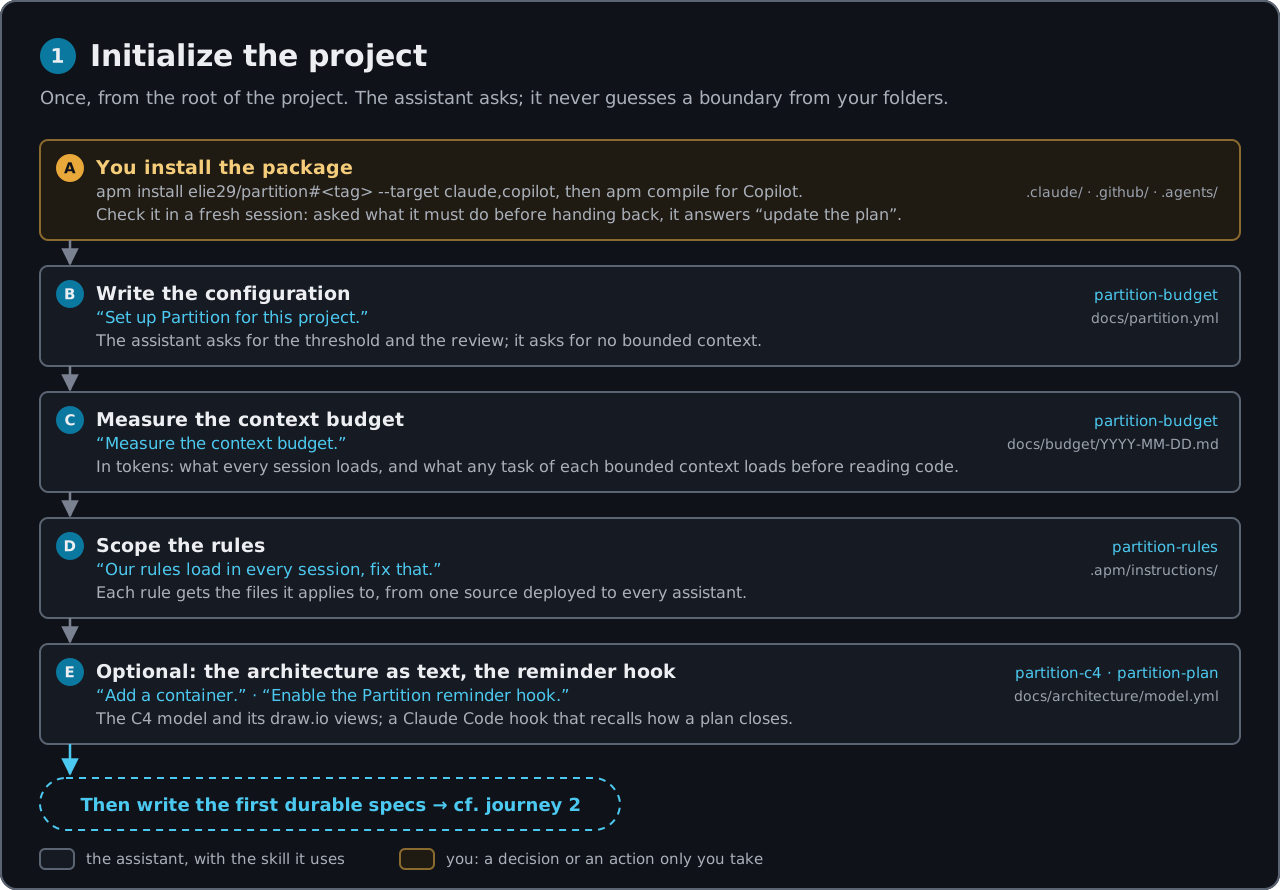
In the figure, a blue step is the assistant with the skill it uses; an amber step is yours.
The situation
You have a repository, and an assistant that reads the same rule file in every session, whatever the task. There is no place for the state of the work, and no figure for what a session loads before it reads a line of code. You want Partition in place before the first bounded context is written, and you want it to touch nothing you did not ask for.
What you bring
A machine ready for the install. The APM CLI, Git and Node.js 22 or later. Python 3 and Bash are used by one skill (partition-gate) and by the optional reminder hook. While the package repository is private, APM needs a credential first: apm auth github.com.
The answers the configuration asks for. The assistant asks; it does not guess them from your folders. In the guide, [TL] and [architect] bring them, each from the role that owns it:
| Question | Who answers in the guide | What the answer looks like |
|---|---|---|
| The budget threshold | [architect] |
the default, 32 000 tokens, until the first real assessment corrects it |
| When the assessment is held | [architect] |
quarterly, or every six sprints |
| Where the plans live, when the setup starts as a plan and nothing in the project names a folder | [TL] |
docs/plans/; otherwise the template’s default, which you may change |
| The paths of specs, contracts and sources | [architect] |
the template’s defaults, unless you have a reason |
No bounded context is asked at setup, and none is listed by hand: each comes from a source (a contract, a PRD, a spec written before Partition, a context you describe) in the next journey, where partition-shape declares each one it retains. A source is read where it lives, in any folder of the repository; only one pasted or described in the chat, or a contract read from a URL, is saved to a default folder, as the repository map says.
Your existing rules. Whatever file your assistant loads in every session today (a CLAUDE.md, AGENTS.md, copilot-instructions.md), and the decision of which rules really hold everywhere. In the guide, “plans live in docs/plans/” and “one package per bounded context” stay in the entry file; every other rule gets a scope.
The people of the assessment. The first measure is recorded as an assessment: who held it, what is coming, the warning signs observed, and the decision. On the first day, the warning signs are usually “not observed” and the decision is “nothing”, but a person says so.
What you say
In a terminal, at the root of the project. Pin a release tag and pick one target per project:
# Claude Code
apm install elie29/partition#<tag> --target claude

# GitHub Copilot
apm install elie29/partition#<tag> --target copilot
Then in a fresh session, to check the install:
What must you do before you hand control back to me?
Then the setup itself. You do not call the skills by name; you say what you are doing. Either one prompt at a time, as the README’s The first day gives them:
Set up Partition for this project.
Measure the context budget.
Our rules load in every session, fix that.
or the whole setup as one piece of planned work, as the guide does:
Open a plan to set up Partition in this project: its configuration, the rules of our entry file moved to scoped rules, a first measure of the budget.
Inside that plan, answer each question it asks. When it stops without a question, or after a validation it asks you for, say “Go on with the plan.” When it reaches the rules, say “Migrate the rules of CLAUDE.md.”, naming your own entry file.
Optional, on the same day. “Enable the Partition reminder hook.” (Claude Code only), and, when your team already has a hand-drawn architecture diagram, “Turn our draw.io into the model.”
What comes back
The install: the package, and nothing under docs/
apm install adds what the package ships, and nothing else:
| Claude Code | GitHub Copilot | |
|---|---|---|
| 12 skills | .claude/skills/partition-*/ |
.agents/skills/partition-*/ |
| 1 agent | .claude/agents/spec-auditor.md |
.github/agents/spec-auditor.agent.md |
| 1 always-on instruction | .claude/rules/partition.md |
.github/instructions/partition.instructions.md, scoped to every file (**) |
Plus apm.yml and apm.lock.yaml. Your own files are untouched: Partition writes no AGENTS.md, CLAUDE.md or .github/copilot-instructions.md, and needs no apm compile. There is no docs/ folder, no docs/partition.yml, no plan: nothing runs unasked. Commit apm.yml, apm.lock.yaml and the deployed files, so every clone has them; apm_modules/ is a download folder APM ignores for you.
The instruction is loaded when a session starts, which is why the check needs a fresh session: one opened before the install never sees it. The assistant answers from the instruction, not from a skill: update the plan first (tick what is done, set Resume at, append the decisions and the blockers), then reply, and never commit, because you commit. If the answer does not say “plan first”, the instruction is not loaded: stop there. To answer, it creates nothing.
From now on, the descriptions of the package’s skills load in every session. On Claude Code, they share one listing with every installed skill, within a budget the README explains. That is the first line of what the budget will measure.
The plans folder, settled once
When the setup starts as a plan, partition-plan first settles where plans live, and never guesses it again:
docs/partition.ymldeclares it:paths.plans. That folder is used, whateverbridgesays: that key only names the tool that writes the plans’ body.- Nothing is declared there, but an instruction of your project names one folder: your team has decided, so the assistant uses it without asking, says which, and records it.
- Nothing names it: it looks for
docs/plans/. It exists: it uses it and records it. It does not: it asks you once, and records your answer. It never searches further: tools keep plans in folders of their own.
When docs/partition.yml does not exist yet, this is the moment it is created, with that one key:
# docs/partition.yml
# yaml-language-server: $schema=../.claude/skills/partition-budget/assets/partition.schema.json
paths:
  plans: docs/plans
If your own instructions name another folder than the project’s, the assistant says that they disagree, so you can align them: what docs/partition.yml declares wins, then the project’s instruction.
The plan opens from its template: the header (Status, Resume at, Last updated), the ## Tasks index, the goal, one section per task with its verification command and its expected result written before it runs, then ## Decisions and ## Blockers.
docs/partition.yml: created with you, not by hand
partition-budget creates the configuration from the template it ships, with you. It asks for what the file does not say: the threshold, the schedule of the assessment. It asks for no bounded context and does not guess one from your folder tree: contexts: stays absent or empty until partition-shape declares each bounded context it retains. Every key your answers leave alone is written at its default, with its comment, so you see each key when you adjust the file later:
# yaml-language-server: $schema=../.claude/skills/partition-budget/assets/partition.schema.json
# Partition - project configuration.
# ...the template's comments...

version: 1
target: claude # whose loading rules the gauges follow: claude | copilot
bridge: none # none, or the tool that writes the plans' body (superpowers, bmad, ...): information only

paths:
  specs: docs/specs
  invariants: docs/specs/invariants.md
  plans: docs/plans
  contracts: docs/contracts
  sources: docs/sources # PRDs and described contexts, decomposed by partition-shape
  # schemas: docs/schema      # declare it only if the project documents its persistence

budget:
  always: 32000 # the owner's limit: no bounded context may load more tokens than this before reading code
  chars_per_token: 4
  review: quarterly # when the assessment is held, e.g. quarterly, every six sprints
The first line points your editor at the schema partition-budget installed (.agents/ instead of .claude/ for Copilot), the only list of the keys. The budget script checks the file against it before it measures: an unknown key, a wrong type or a value out of range stops it, with every finding and its path. The folders under paths: are yours to move; the repository map says what each one holds.
Later journeys add to this file: each new bounded context is declared in it when it is created, and the form of a hexagon when you choose one.
The first measure: the baseline
The budget script runs, and you get, in tokens:
- Loaded by every session: your entry file, the package’s instruction, every rule file without a scope, the invariant register, and the descriptions of the installed skills and agent. Paid before any work starts.
- One gauge per bounded context: that total, plus the context’s spec, its area file and the scoped rules that match its code; what any task of it loads before reading a line of code. None yet while no bounded context is declared.
- Plans in progress: each plan whole, against what a resume reads.
- Files touched per change: the median over the last commits, the first warning sign, once there is enough history.
The output is pasted, unedited, into docs/budget/YYYY-MM-DD.md, made from the assessment template: who held it, what is coming, the warning signs, the decision. Every figure comes from the run; none is written by hand. This first record is the baseline every later assessment compares with.
The rules: one source, a scope on each
partition-rules migrates the rules you already have, and nothing moves before you validate:
- It runs the budget and lists the rules without a scope, with their size.
- It proposes one file per topic in
.apm/instructions/, named<profile>-<topic>.instructions.md, each with the files it really concerns (applyTo), and what leaves the entry file. A command to build or run is not a rule: it belongs to the README. - It quotes what is said twice, across your files and the entry file.
- It waits for your validation.
-
It moves the text without rewriting it, except its headings, so each file starts like this:
--- description: 'Backend architecture: layers, dependency direction, where decisions live' applyTo: 'src/main/**' --- - The old lines stay in your entry file until you remove them, and it tells you so: while both exist, the rules load twice.
apm installdeploys each rule to every assistant in its own format, scoped by itsapplyTo. Never edit the deployed copies: edit the source and install again.- The budget runs again and shows the every-session total before and after. Once you have removed the moved lines, the total goes down, and no rule is listed “without a scope”; the package’s
.claude/rules/partition.mdis listed as(instruction), always on by design: its scope is every file,**.
What stays in the entry file is a map: what the project is, the few rules that hold everywhere, where the rest lives.
The closing
When the setup ran as a plan, ticking its last task starts the closing in the same turn, without you asking. partition-gate gives its verdict on the plan’s changes, saying what ran and what could not be verified. The assistant lists what the work established for a spec, an area file or the invariant register: on a setup, zero is the normal outcome, and it says so. When the setup changed what users install, run or configure, such as a build command that left the entry file, partition-readme realigns the README. On a SHIP verdict the plan is then done. On HOLD it stays in progress: each reason becomes a task, or a blocker naming its owner when only a person can fix it. On SHIP WITH CONDITIONS, each condition becomes a task or a blocker the same way, and the plan closes once they are done.
The options
- The reminder hook.
partition-planfinds Python 3, copies a small script to.claude/hooks/and merges two entries into.claude/settings.json. It prints a reminder when a plan is markeddoneor a commit is about to be created, and touches nothing. Removing the two entries disables it. It is never installed unless you ask, and a package update does not refresh the copy. - The architecture as text.
partition-c4writesdocs/architecture/model.ymlfrom its template, or from your hand-drawn.drawiofile, read once. A box whose kind or parent the drawing leaves open is a question to you, never a guess. It then generates the draw.io views from the model.
What you decide
- The bounded contexts, later. None is asked at setup, and the assistant never draws a boundary from your folders. Each comes from a source in the next journey: you validate each by name, and give the paths of its code when asked.
- The threshold and the schedule of the assessment. The default is a starting point; the first real assessment corrects it.
- The plans folder. When the setup starts as a plan and nothing in the project names a folder, you are asked once. Otherwise
partition-budgetwrites the template’s default,docs/plans, which you may change. - Which rules hold everywhere, and the scope of each other rule. You validate the migration before anything moves, and you remove the old lines from the entry file yourself.
- What the assessment records: who held it, the warning signs observed, and the decision, with the names of those who took it.
- Whether to enable the reminder hook, and whether to describe the architecture now or later.
- Every commit. The assistant never commits; the setup ends in your working tree.
Then the first durable specs: from a source or from what you describe, in the next journey.
Go deeper
- Step 00: from an empty folder to an installed package, and the check in a fresh session.
- Step 01: the plans folder,
docs/partition.yml, the rules migrated and scoped, the first budget record and the hook. - Install and The first day, in the README.
- The skills behind this journey:
partition-budget,partition-rules,partition-plan.
Back to the series.